Stuart Cheshire
Sidney Sussex College
However, all simulations are imperfect and make approximations, and I realized recently that what is important is not what the program doesn't do, but what it does do. The vital fact is that there is an inviolate set of rules which govern events in the simulation. Tanks always move at the same speed over each particular type of terrain. Shells always hit building or tanks or other obstacles in their path. Mines always explode if a tank tries to pass over them. None of these things are allowed to be influenced by factors such as how busy the network is, or how busy any particular machine is, or how full input and output buffers are.
In effect, a simulated World has been created. It may not be a copy of the Real World, but it is consistent within itself; it has its own `laws of physics' which govern the action of all objects in the World, and cannot be violated.
Hence, `Simulation' is indeed an accurate term to describe it.
An important distinction between this and most computer games is that the model of events being simulated and the view on the screen are not the same thing. Usually, the screen represents the entire model, and objects leaving the screen leave the domain of the model.
In Bolo, however, the model is represented at a deeper level. It too must have edges, but its edges are much farther away, across a wide expanse of deep sea, far beyond the range of normal activities. To cope with the the inevitable player who would rather try to see if he can fall off the edge of the model and crash the program than actually play the game, the boundaries of the model are protected by mines (the floating nautical type, with spikes on). If he is still undeterred and attempts to cross the minefield then his tank and boat will be blown up.
There is a single global model being simulated. Each player may see on his screen a view of a different part of the model, but the underlying model is global. On more powerful machines it is hoped that it will be possible to generate a three dimensional picture of the view out of the front of the tank. This view will be very different to the map shown on the BBC micro, but it is only a different view of the same model. This is an important feature of most database systems -- providing to different users different external `Views' of the same internal `Conceptual Model'.
It is important to explain at this point that the networking software is responsible for granting, to one machine at a time, permission to update the map and other shared data structures. It does this by presenting the program with a Token, which tells the program that it can now make changes to the shared data. Only when the program has finished doing this (it should try not to take too long) is the Token passed to another machine.
Where the phrase `receiving the Token' is seen, this is what is meant -- receiving permission to make changes to the database. A more precise explanation of what this involves is given in "The Network".
There is other data which can be altered at any time, such as the location of the player's tank. Each machine is the primary site for the data about its own player's tank, and can change it whenever it wishes. The secondary copies of this information (in other machines) are updated periodically, but will usually be a few milliseconds out of date with the primary copy.
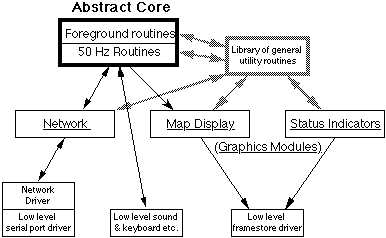
The various modules of the program are written as self-contained units which are linked at compile time. The exception is the Low-Level Serial Port Driver, which is linked at run-time, to enable the same program to be run on different hardware simply by loading a different driver, instead of having to re-compile and re-link all the code. This module is used by the Network Driver, which provides the standard software interface required by the Network Module of the program. This standard software interface could in principle be used by any program, not just this game.
The Network Module is called under interrupts, (i) to process the packets provided by the Network Driver, and (ii) to provide data about the state of this player's tank etc. when so requested by the Network Driver.
The two Graphics Modules do the work of presenting to the user a pictorial representation of the processes being modeled by the Abstract Core of the program. The Map Display Module displays a view of the map looking down from above like an aerial photograph. The Status Indicators Module shows the player how many pillboxes he owns, who his allies are, how many shells and mines his tank is carrying etc. Both are entirely superfluous to the correct running of the program, although of course it would not be much of a game if the players couldn't see what was happening. This fact was used to help speed the writing of the Macintosh version, since a large part of the code could be omitted and the program would still work. It was not necessary, for the purposes of development, to be able to see on the Macintosh screen what was happening, since, because it was communicating across the network, it was possible to watch how it's tank was moving and shooting on one of the other machines (ie. a BBC micro). Of course, the finished version will have to provide the player with a view of the map, in the same way that the BBC micro version does.
The goal of the subdivision was that all of the higher modules could be machine independent (written in C) and only the three low level modules would have to be rewritten for each machine. This also provided a level of hardware independence, which is to be utilized in providing a selection of network drivers to work with different hardware.
All machines must have a serial port driver for compatibility with other machines, but in certain circumstances other drivers may be applicable. For example, Econet for BBC micro, MIDI[6] for Atari ST, ISO 802.2[7] for IBM PC etc. These would be applicable in situations such as in computer rooms or offices where computers are already wired up together and there is no intention of connecting any other machines. In these cases it would be sensible not to have to wire up all the serial ports in order to use the program.
A particular problem on the IBM PC is the proliferation of many different and incompatible graphics adapters. The use of standard calls by the Graphics Modules to `draw a map square' or plot a `foreground character' means that different Low-Level Framestore Drivers can be written to implement these calls for each type of adapter, in a way transparent to the rest of the program.
It is not expected that this will be necessary for versions on any other computer. A similarly wide variety of different graphics cards is available for the Macintosh II, giving different sizes of screen in different numbers of colours, but the differences are hidden from the programmer at a low level in the Operating System. In principle, the same operating system support is available on the IBM PC, but the drawing routines are extremely primitive and are so slow that they are totally useless, so all commercial software by-passes them and drives the hardware directly.
When there are other players, however, the notion of `the edge of the screen' has to be discarded.
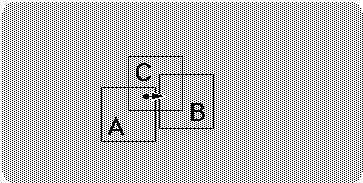
Each of the three players sees on their screen a view of a slightly different area of the map. An object disappearing off the edge of one screen (A) cannot just cease to exist because it could be appearing on the edge of another (B) and indeed could be in the middle of a third player's view (C). Also, the game cannot just create a new object at the edge of player A's screen when it wishes, for if it did then player C would just see it appear from nowhere in the middle of his screen.
The real problem was the lack of any clear definition of what exactly this `more fundamental sense' of position was. The solution was to scrap all the different representations which had evolved and start again.
A definite coordinate system was defined which could be used universally to specify the location of any object in an unambiguous way.
These are called World-coordinates and are stored as a pair of 16-bit numbers. Using them, any position in game-world can be specified to an accuracy of 1/16 of a screen pixel. They are most suitable for internal use for objects requiring high precision, for instance the tank, so that it can move very slowly in steps of less than one pixel at a time[9].
From this, two other standard coordinate types were derived:
Pixel-coordinates are pairs of 8-bit numbers, and are used to specify the position of a particular pixel on the screen.
View-screen map-square coordinates are used to indicate a particular map square on the screen.
View-screen Cell numbers are not a coordinate pair, but a single byte value which can also be used to indicate a particular map square on the screen.
These coordinates are in effect a set of `types' identified by a name and a single letter abbreviation. They are used to specify the types of the parameters taken by a routine, and the type of the result it returns. Adhering to these strict type rules eliminated what had been one of the major sources of bugs in the prototype version.
The World looks like this:
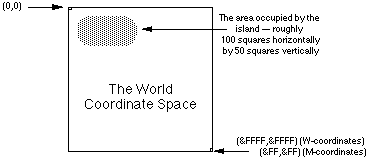
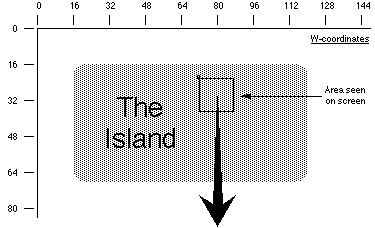
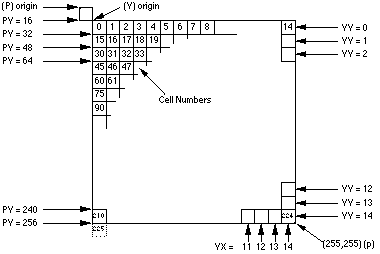
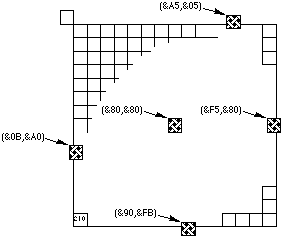
Notice that coordinates in the range &00-&0F indicate characters partially (or completely) off the top or left edges of the screen, and coordinates in the range &F0-&FF indicate characters partially (or completely) off the bottom or right edges of the screen.
Some conversions, such as W>M, are so trivial that they are simply performed in line where required.
Because of the structure of the program, the flow of information to the screen was all one way. The existence of a shell, or tank, having W-coordinates, causes a little character to be plotted at some location on the screen, so a W>P routine is needed. No pixel can ever cause anything to happen in `the World' so a P>W routine is not needed.
The terrain types are:
            Terrain                      Tank   Turning
                                         Speed    Rate
0       Building        (impassable)       -       -
1       River   (destroys shells)          3       1/2
2       Swamp   (slows the tank down)      3       1/2
3       Crater  (can flood with water)     3       1/2
4       Road    (for fast travel)         16       2
5       Forest  (conceals the player)      6       1
6       Rubble  (destroyed building)       3       1/2
7       Grass   (everywhere else)         12       1
8       1/2 destroyed building             -       -
9       River   --      with boat on it   16       2
A       Swamp   --      with mine on it
B       Crater  --      with mine on it
C       Road    --      with mine on it
D       Forest  --      with mine on it
E       Rubble  --      with mine on it
F       Grass   --      with mine on it
Tank speeds are given in W-coordinate units (1/16 pixel) per
1/50 second.Turning rates are given in bradians[11] per 1/50 second.
A tank can drive as fast onto a moored boat as it can on road.
No movement speed is given for buildings because it is inappropriate to have a tank driving over them.
The limited area of defined map proved to be a problem. People wanted to build piers out into the sea and couldn't see why there was an invisible barrier beyond which they could not build.
The map data structure has recently been enhanced to include all data which must be preserved if the state of the game is to be saved for later resumption, and, while doing this, both the problem of the `invisible barrier' and the unpleasant rectangularness of the island were also remedied.
It is not felt necessary to detail the added tables, they simply include pillbox locations, alliance information etc. The change to the map was to store it as a list of scan-lines instead of a simple 100 x 50 array:
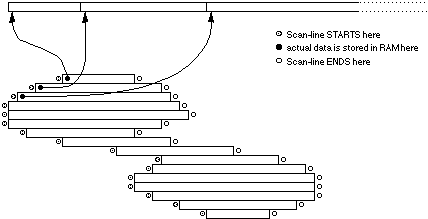
This diagram above does not depict the shape of the island, but the shape of the data structure which stores the terrain information making up the island(s). Any square lying outside the area indicated is not represented anywhere in memory. Accesses to these `invalid coordinates' simply return the `deep sea' code. It is not possible to build anything here, because there is no memory to store the information.
Note that the diagram does not imply that islands are actually connected by any land. The thin central region of the map is occupied by shallow water, not land. The fact that is is shallow sea, not deep sea, means that the players could, of course, build a long bridge across it if they wish. The player who then controlled this bridge would be in a very powerful position.
